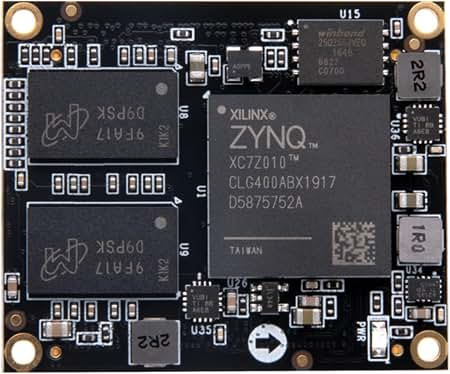
The XC7Z010 and XC7Z020 are the two devices most engineers meet first in the Zynq-7000 family. They appear on the same low-cost development boards, they are supported by the same free design tools, and from the outside they look almost identical. The difference between them is easy to state and surprisingly important in practice: the Z-7020 has roughly three times the programmable logic of the Z-7010.
This article compares the two devices field by field, explains what the extra logic buys you, and gives a simple way to decide which one belongs on your board. It also covers the package options, because the package you pick limits which device you can use later.
What the two devices share
Both devices belong to the Zynq-7000 family from Xilinx, now part of AMD. Every member of the family joins an Arm-based processing system to a block of FPGA logic on one chip. In the Z-7010 and Z-7020 the processing system is the same:
- Two Arm Cortex-A9 cores with NEON and floating-point units
- 32 KB level-one caches per core and a shared 512 KB level-two cache
- 256 KB of on-chip memory and a boot ROM
- A memory controller for DDR3, DDR3L, DDR2 and LPDDR2
- Two Gigabit Ethernet controllers, two USB 2.0 OTG controllers and two CAN controllers
- Two SD/SDIO controllers and pairs of UART, SPI and I2C ports
- Quad-SPI, NAND and NOR flash interfaces
Because the processor side matches, software moves between the two devices with little effort. A Linux image, a bare-metal application or a real-time operating system built for one will run on the other, provided the hardware design exposes the same peripherals. The clock speed of the processor depends on the speed grade of the part, not on whether it is a Z-7010 or a Z-7020.
The programmable logic in both is derived from the Artix-7 FPGA line, built on a 28 nm process. Both include the XADC block, a pair of 12-bit, 1 MSPS analog-to-digital converters that can monitor on-chip temperature and supply voltages or sample external signals.
Where they differ: the programmable logic
The table below shows the logic resources of each device. Treat these as the headline figures and confirm them against the current product selection guide before you commit a design.
| Resource | XC7Z010 | XC7Z020 |
|---|---|---|
| Logic cells (approximate) | 28,000 | 85,000 |
| Look-up tables | 17,600 | 53,200 |
| Flip-flops | 35,200 | 106,400 |
| Block RAM (36 Kb blocks) | 60 | 140 |
| Total block RAM | 2.1 Mb | 4.9 Mb |
| DSP slices | 80 | 220 |
| Packages | CLG225, CLG400 | CLG400, CLG484 |
| Maximum logic I/O pins | 100 (CLG400) | 200 (CLG484) |
Three rows deserve a closer look.
Look-up tables and flip-flops. These are the general-purpose building blocks of any FPGA design. With about three times as many, the Z-7020 can hold three Z-7010-sized designs side by side. In practice that headroom disappears faster than expected, because debug cores, bus interconnect and timing-driven duplication all consume logic.
Block RAM. Video line buffers, FIFOs, packet buffers and lookup tables all live in block RAM. A single full-HD line buffer chain for a 3×3 filter is small, but a design with several filters, a frame-rate converter and a few deep FIFOs can use the Z-7010’s 60 blocks quickly.
DSP slices. Each slice contains a hardware multiplier and accumulator. Filters, color-space converters, transforms and control loops all need them. Eighty slices support a modest signal chain. Two hundred and twenty support multi-channel filtering or a small neural-network accelerator.
Package options and what they mean for your board
Package choice is where many teams get caught. The two devices overlap in exactly one package.
- CLG225 (13 mm x 13 mm, 0.8 mm pitch): Z-7010 only. This is the smallest option, with a reduced set of logic and processor I/O pins. It suits compact, cost-sensitive products.
- CLG400 (17 mm x 17 mm, 0.8 mm pitch): available for both devices. The Z-7010 offers 100 logic I/O pins in this package and the Z-7020 offers 125.
- CLG484 (19 mm x 19 mm, 0.8 mm pitch): Z-7020 only, with 200 logic I/O pins.
If you lay out a board for the CLG400 package, you can fit either device, which gives you a low-cost build and a higher-capacity build from one design. Several well-known development boards are sold in two versions on exactly this basis. Note that the Z-7020 brings out more pins in the same package, so a board meant to accept both should use only the pins common to the two devices.
If you choose CLG225 you are committed to the Z-7010, and if you choose CLG484 you are committed to the Z-7020. Decide this before layout starts, because the footprints are not interchangeable.
Speed and temperature grades
Both devices are offered in several speed grades, shown by the number after the hyphen in the part number, and in commercial, extended and industrial temperature grades. A faster speed grade raises the maximum clock rate of the Arm cores and shortens delays in the logic. These options are independent of the device size, so they do not favor one device over the other. They do multiply the number of orderable codes, which is why it pays to read each code carefully. For example, XC7Z020-1CLG484C is a Z-7020 in the standard -1 speed grade, a 484-ball package and the commercial temperature range.
Where to source them
Both devices have been in production for many years and are widely stocked, but supply of specific speed, package and temperature combinations can tighten without much warning. If you need the larger device in its 484-ball package, Verified Electronics is an XC7Z020-1CLG484C distributor that lists the part and sends components for third-party testing, which is worth having when you buy high-value BGA devices on the open market.
Power and cost
A larger device costs more and draws more static power, because there is more silicon to leak. The gap in static power between these two is small compared with the dynamic power of a running design, which depends on how much logic toggles and how fast. In a battery-powered product the difference may still matter, and the Z-7010 has the advantage there.
On price, the Z-7010 is the cheaper part at any volume. The size of the gap changes with market conditions, so get current quotes for both before deciding. A useful way to think about it: the price difference is what you pay for insurance against running out of logic late in the project. For a product that will ship in tens of thousands of units with a fixed feature set, the insurance may not be worth it. For a product that will gain features through updates, it usually is.
What fits in each device
Real examples make the numbers easier to judge.
Typical Z-7010 designs
- A single-camera pipeline at modest resolution with one or two filter stages
- One or two axes of motor control with encoder feedback
- Protocol bridging, such as converting between a custom serial bus and Ethernet
- Data acquisition with a handful of ADC channels and simple filtering
- I/O expansion and glue logic around a Linux system
Typical Z-7020 designs
- Full-HD video processing with several stages, overlays and scaling
- Multi-axis motion control with field-oriented control on each axis
- Software-defined radio with digital up and down conversion and channel filters
- Small neural-network accelerators for image classification
- Designs that need many I/O pins for parallel sensors, displays or expansion connectors
If your design sits near the boundary, measure rather than guess. Build the design in Vivado for the Z-7010 and read the utilization report. A design that uses more than about 70 percent of the look-up tables will be hard to route and hard to extend, and that is a strong sign to move up.
A simple decision process
- Count your I/O pins. If you need more than 100 logic I/O pins, only the Z-7020 will do, and more than 125 means the CLG484 package.
- Estimate logic use. Add up your known blocks, then add 30 percent for debug, interconnect and growth. Compare the total against 17,600 look-up tables.
- Check block RAM and DSP needs. Video and signal-processing designs usually run out of one of these before they run out of general logic.
- Consider board space. If the board is very small, the CLG225 package may decide the matter in favor of the Z-7010.
- Think about the product roadmap. If new features are likely, the larger device protects the hardware investment.
- Keep the option open if you can. A CLG400 footprint accepts both devices and lets you defer the decision.
Migrating between the two
Moving a design from the Z-7010 to the Z-7020 in the CLG400 package is straightforward. You change the target device in the Vivado project, regenerate the design and rebuild. Pin assignments that use the common pins stay valid, and the software needs no changes beyond the new hardware description.
Moving down is harder. The design has to fit, and it has to meet timing in a fuller device, where routing is more congested. Teams that prototype on the larger device and plan to ship the smaller one should build for the smaller target regularly during development, so that there are no surprises at the end.
Moving between packages always means a new board layout.
Common mistakes when choosing between them
A few errors come up again and again, and all of them are cheaper to avoid than to fix.
- Sizing from the first prototype. Early builds leave out debug logic, error handling and the features marketing has not asked for yet. A design that uses 60 percent of a Z-7010 in month two is rarely still under 100 percent in month twelve.
- Ignoring block RAM. Teams watch the look-up table count and overlook memory. Video and packet designs tend to hit the block RAM limit first, and replacing block RAM with distributed memory eats look-up tables quickly.
- Forgetting the debug cores. Integrated logic analyzers are invaluable during bring-up, and each one takes logic and block RAM. If the device is full, you lose your best debugging tool exactly when you need it.
- Choosing the package for today’s pin count. Extra connectors, a second sensor or a wider display bus can each add twenty or thirty pins. Leave spare I/O in the plan.
- Assuming a faster speed grade fixes a full device. A faster grade helps timing, but it does not create more logic. Congestion in a nearly full device can defeat timing closure at any grade.
The common thread is margin. Whichever device you select, aim to finish the first production release with a comfortable share of the logic, memory and pins still free.
Board design considerations
From a hardware point of view the two devices ask for the same things. Both need several supply rails for the processor core, the logic core, auxiliary circuits, the memory interface and the I/O banks, brought up in the sequence the datasheet specifies. Both use a 0.8 mm ball pitch, which can be routed on a modest layer count with standard design rules. The DDR memory interface is the most demanding part of the layout in either case. Because these requirements match, the effort of designing the board is almost the same for both devices, which is another argument for choosing a footprint that accepts either.
Development boards
Low-cost boards exist for both devices, and several lines offer the same board with either chip fitted. A Z-7010 board is a sensible first purchase for learning the tool flow and for software-heavy projects. A Z-7020 board is the better choice for vision, radio and machine-learning experiments, where the extra block RAM and DSP slices are needed almost at once. Both devices are covered by the free edition of the Vivado tools, so there is no license cost to choosing the larger one.
Frequently asked questions
Is the processor faster in the Z-7020? No. The processing system is the same in both. Processor speed depends on the speed grade.
Can one board take either device? Yes, if it uses the CLG400 package and only the pins both devices provide.
Do both devices have high-speed serial transceivers? No. Neither has gigabit transceivers in the programmable logic. Designs that need them should look at the larger members of the family.
Will my software need to change? Not for the processor itself. You will regenerate the hardware description and device tree to match the new logic design.
Which is easier to buy? Both are common. Availability varies by exact code, so check the specific speed grade, package and temperature grade you need.
Conclusion
Choose the XC7Z010 when the logic requirement is small and well understood, when board space or unit cost is tight, or when the product is mainly a software system that needs a little custom hardware. Choose the XC7Z020 when the design involves video, signal processing or many I/O pins, or when you expect the logic to grow over the life of the product. If you cannot yet tell, design for the CLG400 package and keep both options available. In every case, confirm the resource figures and package details against the current manufacturer documentation before the board goes to layout.